
The Mini-Cart feature is a great way to reduce friction in your customer purchase journeys, allowing them to add items to the cart with no interruptions to their browsing. In addition to improving your customer’s experience while shopping on your site, the Mini-Cart also allows for the integration of additional features within the modal itself, providing more conversion opportunities.
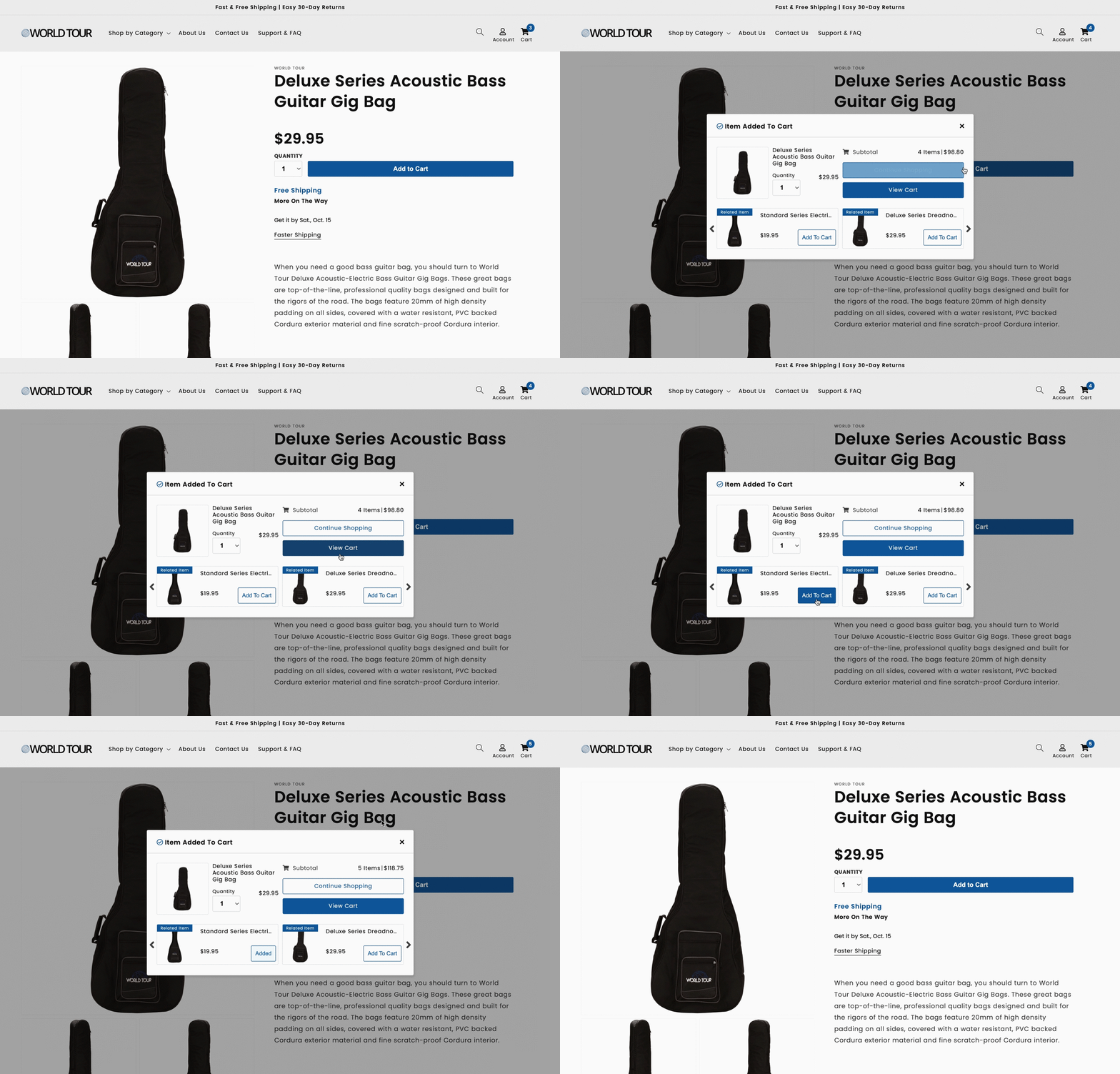
Our Mini-Cart is a small pop-up modal that appears when a customer adds a product to their cart from the product page. From the modal, the customer can adjust the quantity of items added and choose whether to continue shopping or move forward to checkout. For clients using our Related Items feature, a carousel of related products can be added to the modal, allowing customer to quickly add related accessories to the cart at the same time.
Styling the Mini-Cart
As with anything on your site, presentation is important. This is especially true when it comes to smaller pop-up modals like the Mini-Cart. To keep the customer experience as seamless and enjoyable as possible, the Mini-Cart should be styled in a way that matches your site and makes customer actions intuitive. Read below to see our recommended guidelines on styling. We at the DCP team are always ready and willing to assist with the implementation of this feature, as well as to give personalized recommendations on how best to style the cart for your specific site.
Be Consistent
Match the modal’s text and button colors to your site’s existing palette.
Make the main button filled and the secondary button outlined, with a smooth hover effect.
Why it matters: The modal opens on top of your product page, so matching styles help it feel like part of your store rather than a separate window.
Be Responsive
Stack the layout on smaller screens, with buttons side by side.
Swap carousel arrows for dot navigation on mobile.
Why it matters: The modal covers part of the screen, so it needs to fit cleanly on any device without crowding the content.
Keep it Tidy
Frame product images in uniform, bordered squares.
Shorten long product titles with an ellipsis.
Why it matters: Shoppers glance at the modal quickly before moving on, so a clean, even layout helps them confirm their item at a glance.
Mini-Cart Example
See the Mini-Cart in action below!
Want more information? Reach out to a DCP team member today, or head over to our Mini-Cart Documentation for more information.


